Panel Cookies
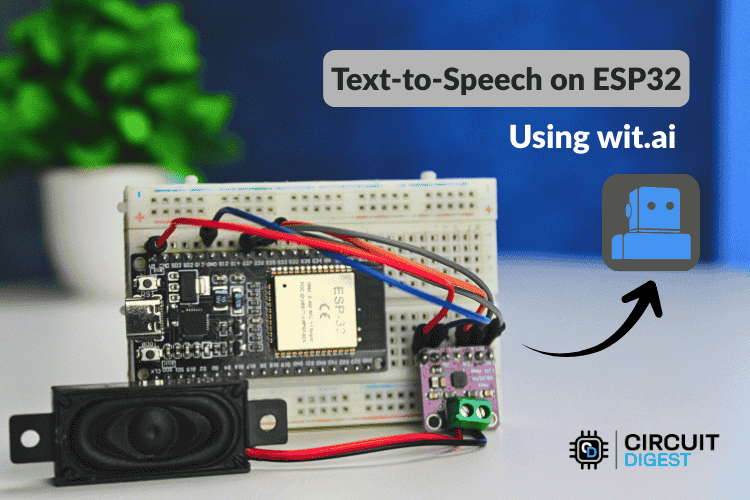
Voice-Enabled ESP32: AI-Powered Text-to-Speech Using Wit.ai
11 days ago | Blogs | by: rinme


Text-to-Speech (TTS) technology transforms written text into spoken audio, enabling devices to “talk” and interact naturally with users. While modern computers and smartphones handle TTS easily due to their powerful processors and abundant memory, adding high-quality voice output to microcontroller projects — such as those built with the ESP32 — can be challenging. The ESP32’s limited processing power and memory make local speech synthesis impractical. That’s where AI-powered cloud services come in.

In this $ ESP32 Text to Speech Using AI $ project, you’ll learn how to connect an ESP32 development board to Wit.ai, a cloud-based AI platform that generates natural-sounding speech. By sending text to Wit.ai and streaming back the resulting audio, your ESP32 can vocalize any message through a connected speaker — without taxing its limited hardware.


If you want to make a PCB for this project and make it more compact, use the services of JLCPCB and get great PCBs for very low pricess. The order process is just a couple of minutes, so try it out!

Why Use Cloud-Based TTS for ESP32?

Microcontrollers like the ESP32 have significant hardware constraints:

  1. Only ~520 KB of RAM — not enough for large speech models
  2. A 240 MHz dual-core CPU — too slow for real-time synthesis
  3. Limited flash storage — insufficient space for full voice databases
  4. No built-in digital signal processor (DSP) — makes audio synthesis demanding

To overcome these challenges, this project uses a cloud-based AI TTS service. The ESP32 sends plain text over Wi-Fi to Wit.ai, which processes the text into audio and sends it back as a stream. This lets your project deliver clear, human-like voice output while keeping code and hardware simple.


How Text-to-Speech Works (Behind the Scenes)

Before speech is generated, several steps must occur:

  1. Text Normalization: Expand abbreviations, numbers, and symbols into readable format.
  2. Linguistic Analysis: Break text into phonemes (the smallest units of sound).
  3. Prosody Generation: Add natural pauses, stress, and intonation.
  4. Audio Synthesis: Produce a digital speech waveform.
  5. Playback: Stream the audio data to a speaker.

Most microcontrollers lack the resources to do all of this locally, so outsourcing the heavy lifting to an AI service like Wit.ai delivers the best quality and easiest workflow.


Setting Up Your Wit.ai Account

  1. Create Account: Sign up at the Wit.ai website using email or Meta login.
  2. New App: From your dashboard, create a new application — name it something meaningful.
  3. Get Token: Go to Settings → HTTP API to retrieve your server access token.
  4. Secure Token: Store it safely; don’t hardcode it in public repositories.

Installing Required Libraries

Open the Arduino IDE:

  1. Go to Library Manager.
  2. Search for “WitAITTS”.
  3. Install the library created specifically for ESP32 TTS integration.

Load the example sketch and replace placeholders with your Wi-Fi credentials and Wit.ai token.

Uploading and Testing

  1. Upload the sketch to your ESP32.
  2. Open the Serial Monitor at 115200 baud.
  3. Type any sentence and press Enter.

Your ESP32 sends this text to Wit.ai and plays back the synthesized audio.

???? Optimizing Audio Quality

The project streams audio incrementally, which saves memory and improves responsiveness. However, playback quality can vary based on:

  1. Wi-Fi signal stability
  2. Power supply quality
  3. Speaker fidelity

???? Conclusion

This project demonstrates a powerful way to bring natural AI speech to your ESP32 for alerts, assistants, interactive devices, and more. By harnessing Wit.ai’s cloud TTS, you keep your embedded project efficient, scalable, and impressively responsive.

Explore more $ Arduino projects $ and $ ESP32 projects $ , and share your own builds to grow the community!


11 days ago | Blogs | by: rinme


Last tutorials

Cool 150V Nixie Watch - DIY
Planar Speaker With Flexible PCB
ESP32 WiFi Walkie Talkie with ESP-NOW and I2S Microphone
1500W Triple Phase Rectifier for wind turbine
Plasma Toroid Generator, whaaat?

ADVERTISERS


Affiliate Disclosure

ADVERTISERS

JLCPCB


Curso Arduino Online nivel bajo