
 About me
  History
  Let's learn
  Contact us
  Arduino tutorials
 Circuits tutorials
  Robotics tutorials
 Q&A
Q&A Blog
Blog  Arduino
  Circuits
 Robotics
  Modules
  Gadgets
  Printers
  Materials
  3D objects
  3D edit
  Donate
  Reviews
  Advertising




Android app + Bluetooth + Arduino control
Arduino part

The connection between the bluetooth module and Arduino is just a normal serial comunication where we connect the Rx pin of the module to the Tx pin of the arduino and Tx pin of the module to the Rx pin of the Arduino. I'll use a normal relay module. Connect 5 volts and gnd to the module and the enable pin as well. I'll use pin 11 this time to turn on my lamp. Connect the other 3 enable pin to other relays. The example is made with just one relay.
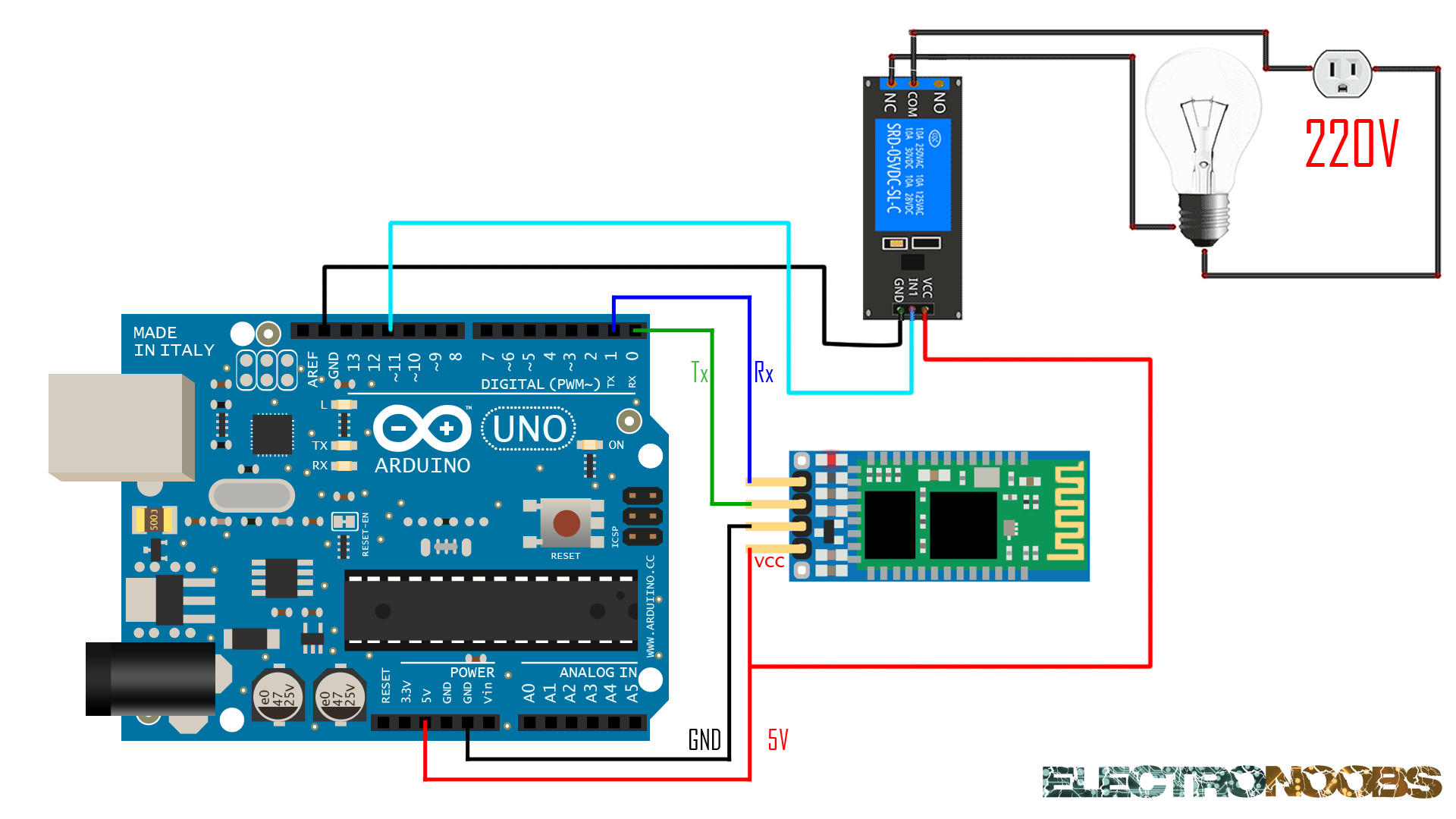
The next code will receive the sended characters via serial comunication. It will decide when to turn to high or low each of the declared outputs. Opening the serial monitor we could see each sended character. You can download the

//---------ELECTRONOOBS----------//
//--------BT app control---------//


int lamp=11;
int vent=12;
int light=8;
int pc=7;

int Received=0;
int light_state =0;
int vent_state = 0;
int pc_state = 0;


void setup(){

  Serial.begin(9600);
  pinMode(lamp,OUTPUT);
  pinMode(vent,OUTPUT);
  pinMode(light,OUTPUT);
  pinMode(pc,OUTPUT);

}

void loop(){

 if(Serial.available()>0)
 {

    Received = Serial.read();
    char Rec = char(Received);
    if (Rec != '0')
    {
    Serial.println(Rec); //This is to visualise the received character
    }

 }

////////////////LIGHT/////////////////////
if (light_state == 0 && Received == '1')
  {
    digitalWrite(light,HIGH);
    light_state=1;
    Received=0;
  }
if (light_state ==1 && Received == '1')
  {
    digitalWrite(light,LOW);
    light_state=0;
    Received=0;
  }
///////////////////////////////////////////


////////////////VENT/////////////////////
if (vent_state == 0 && Received == 'a')
  {
    digitalWrite(vent,HIGH);
    vent_state=1;
    Received=0;
  }
if (vent_state ==1 && Received == 'a')
  {
    digitalWrite(vent,LOW);
    vent_state=0;
    Received=0;
  }
///////////////////////////////////////////


////////////////PC/////////////////////
if (pc_state == 0 && Received == '2')
  {
    digitalWrite(pc,HIGH);
    pc_state=1;
    Received=0;
  }
if (pc_state ==1 && Received == '2')
  {
    digitalWrite(pc,LOW);
    pc_state=0;
    Received=0;
  }
///////////////////////////////////////////


////////////////LAMP/////////////////////
 if (Received =='8'){
   digitalWrite(lamp,HIGH);
  }
 if (Received == '9'){
 digitalWrite(lamp,LOW);
 }
 ///////////////////////////////////////////


}
Go back:
 See more tutorials: